MCP服务器
信息
使用此功能需要更新Reqable到v3.2.0及以上版本。
什么是MCP服务器
Reqable MCP(Model Context Protocol,模型上下文协议)是一项允许AI助手(如Claude、Cursor、Codex等其他兼容支持MCP的工具)直接与Reqable应用程序交互的功能。Reqable提供的MCP服务器直接内置在Reqable的安装包中,无需额外下载和安装,支持以stdio的方式配置到AI助手中。
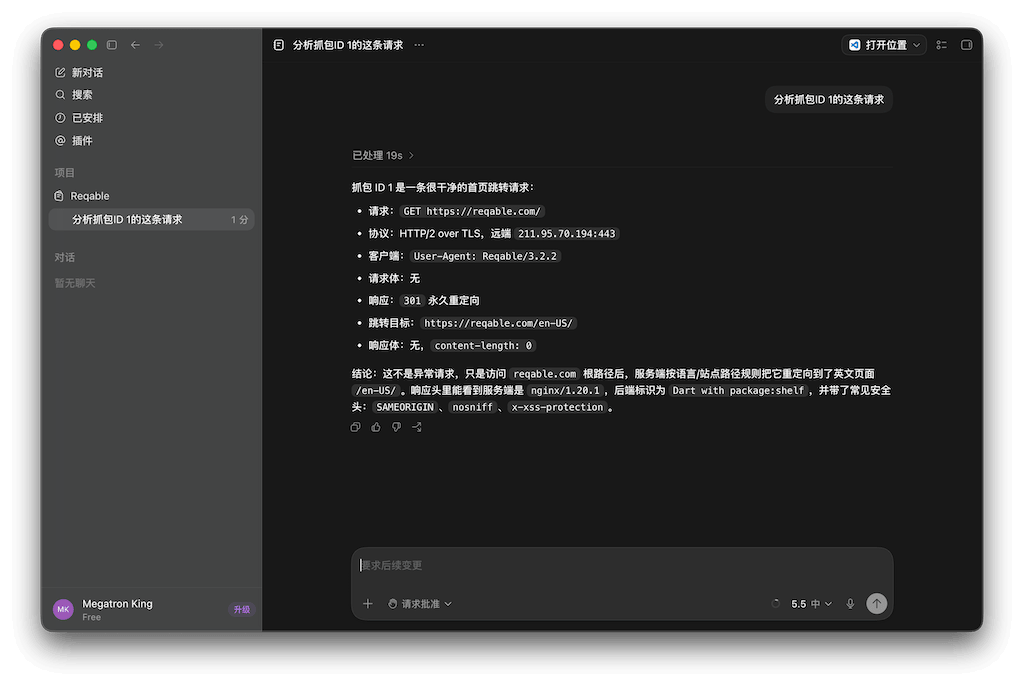
在AI助手中配置好Reqable MCP服务器后,便可以让AI助手来操控Reqable,例如:
- 分析抓包ID 1的这条请求。
- 分析
reqable.com相关的请求。 - 对全部的
reqable.com域名的请求创建断点。 - 新建一个脚本规则,对抓包ID 2请求的响应进行AES解密,并输出解密后数据到控制台。
- 新建一个重写规则,将
https://reqable.com的响应体中全部的123都改成456。 - 新建一个名称为
Development的API集合,将本项目中调用到的全部的接口保存到其中,并添加说明文档。 - 预测明天哪只股票会涨停(🐶这个不支持)。
使用方式
从应用 工具 菜单中可以打开MCP服务器配置指引页面,我们提供了一些常用AI助手的配置说明和一键安装功能。
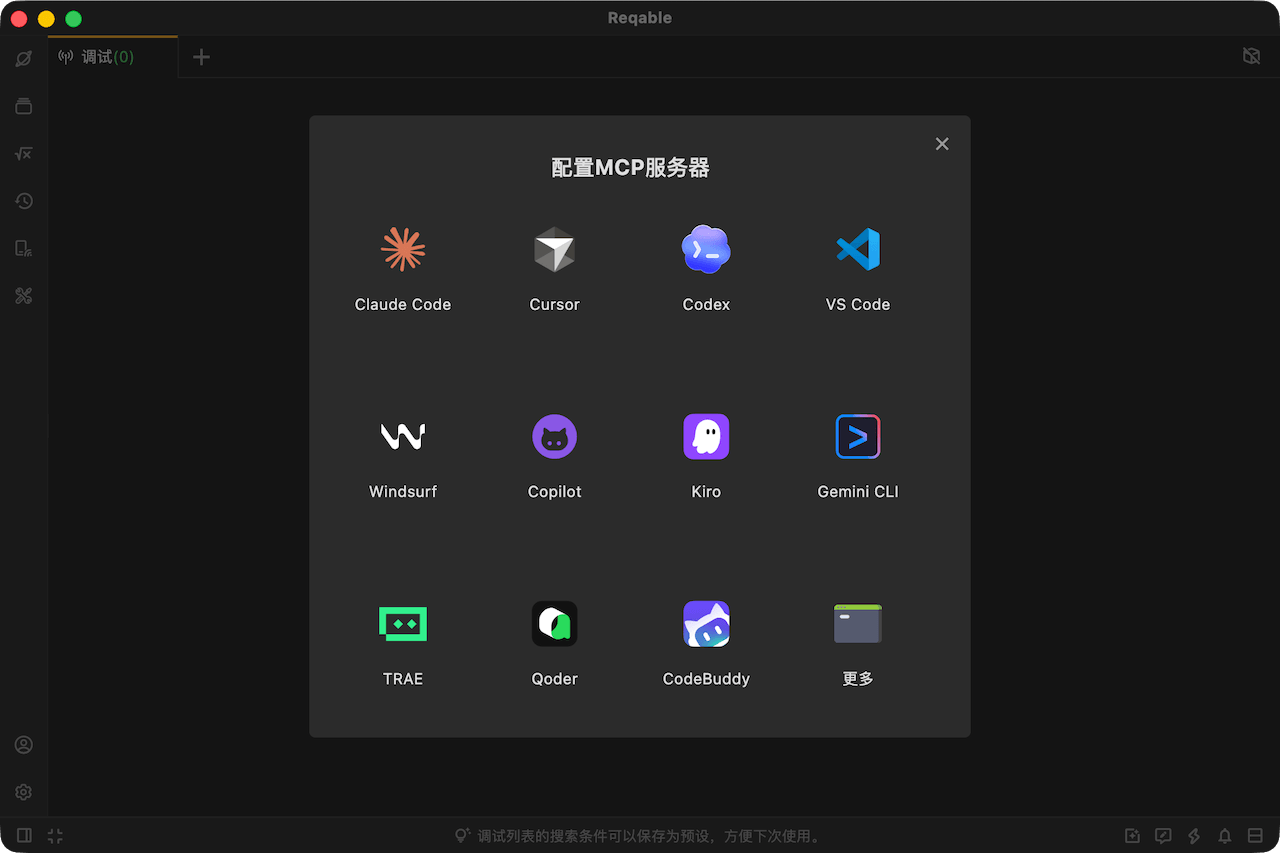
在AI助手中配置好后,便可以让AI操控本机的Reqable了,更多MCP使用教程可以参考:
https://mp.weixin.qq.com/s/7qWrara2ELJBhGvsvBqbbw
如果要让AI控制非本机(例如手机)的Reqable,在配置MCP时可以使用 --host 和 --port参数。
| 参数 | 缩写 | 说明 | 默认值 |
|---|---|---|---|
--host | -h | 可选,Reqable API 服务地址。 | 127.0.0.1 |
--port | -p | 可选,Reqable API 服务端口。 | 优先读取 Reqable 本地配置中的 proxyPort,读取失败时回退到 9000 |
--scope | -s | 可选,控制注册哪些工具, minimal 仅注册常用工具, all 注册全部工具。 | minimal |
支持功能
Reqable MCP 提供了上百个 MCP Tool,按功能分类如下。
HTTP请求测试
| Tool | 功能 | 包含在 minimal |
|---|---|---|
rest_http_create_from_url | 通过 URL 创建新的 HTTP API 标签页。 | ✅ |
rest_http_create_from_curl | 通过 cURL 创建新的 HTTP API 标签页。 | ✅ |
rest_http_update | 使用完整 JSON 载荷更新 HTTP API。 | ✅ |
WebSocket请求测试
| Tool | 功能 | 包含在 minimal |
|---|---|---|
rest_websocket_create_from_url | 通过 URL 创建新的 WebSocket API 标签页。 | ✅ |
rest_websocket_update | 使用完整 JSON 载荷更新 WebSocket API。 | ✅ |
环境变量
| Tool | 功能 | 包含在 minimal |
|---|---|---|
environment_list | 列出全部环境,并标记当前激活环境。 | ❌ |
environment_get_by_id | 按 ID 获取环境详情。 | ❌ |
environment_get_active | 获取当前激活环境。 | ❌ |
environment_create | 创建新的环境。 | ❌ |
environment_update | 更新环境内容。 | ❌ |
environment_delete | 删除指定环境。 | ❌ |
environment_select | 按 ID 选择激活环境。 | ❌ |
environment_builtin_variables | 列出 Reqable 提供的内建环境变量。 | ❌ |
集合
| Tool | 功能 | 包含在 minimal |
|---|---|---|
collection_list | 列出全部 Collection ID。 | ✅ |
collection_structure | 获取全部 Collection 的树形结构。 | ✅ |
collection_get | 按 Collection ID 获取集合属性。 | ✅ |
collection_create | 创建新的 Collection。 | ✅ |
collection_update | 更新 Collection 属性。 | ✅ |
collection_delete | 删除指定 Collection。 | ✅ |
collection_folder_get | 按 Collection ID 和 Folder ID 获取文件夹属性。 | ✅ |
collection_folder_create | 在 Collection 中创建文件夹。 | ✅ |
collection_folder_update | 更新 Collection 文件夹属性。 | ❌ |
collection_folder_delete | 删除 Collection 文件夹。 | ❌ |
collection_api_get | 获取 Collection 中指定 HTTP 或 WebSocket API 的详情。 | ✅ |
collection_api_create | 通过 cURL 在 Collection 中创建新的 API。 | ✅ |
collection_api_add | 将已创建的 HTTP 或 WebSocket API 加入 Collection。 | ✅ |
collection_api_update | 更新 Collection 中已有的 API。 | ✅ |
collection_api_delete | 从 Collection 中删除指定 API。 | ✅ |
collection_api_generate_curl | 根据 Collection ID 和 API ID 生成 cURL。 | ✅ |
脚本资源
| Tool | 功能 | 包含在 minimal |
|---|---|---|
script_framework | 获取 Reqable Python 脚本框架内容,创建或更新脚本前应先调用。 | ✅ |
script_template | 获取 Reqable Python 脚本模板内容,创建或更新脚本前应先调用。 | ✅ |
代理控制
| Tool | 功能 | 包含在 minimal |
|---|---|---|
proxy_set | 控制Reqable中的代理,例如是否覆盖系统代理等。 | ✅ |
抓包列表
| Tool | 功能 | 包含在 minimal |
|---|---|---|
capture_live_status | 获取当前实时抓包状态。 | ❌ |
capture_live_set_enabled | 启动或停止实时抓包。 | ✅ |
capture_live_filter | 过滤当前抓包记录并返回匹配记录 ID。 | ✅ |
capture_live_get_by_id | 按数字 ID 获取抓包记录详情。 | ✅ |
capture_live_clear | 清空当前保存的实时抓包记录。 | ❌ |
capture_live_generate_curl | 为指定抓包记录生成 cURL 命令。 | ✅ |
capture_live_compose | 将抓包记录组装为新的 HTTP 或 WebSocket API 标签页。 | ✅ |
capture_live_collection_add | 将抓包记录加入指定 Collection。 | ✅ |
SSL代理
| Tool | 功能 | 包含在 minimal |
|---|---|---|
capture_ssl_proxying_get_config | 获取 SSL Proxying 当前配置。 | ❌ |
capture_ssl_proxying_get_active | 获取当前激活的 SSL Proxying 配置。 | ❌ |
capture_ssl_proxying_lookup | 按 ID 获取 SSL Proxying 配置详情。 | ❌ |
capture_ssl_proxying_select | 按 ID 选择激活的 SSL Proxying 配置。 | ❌ |
capture_ssl_proxying_create | 创建新的 SSL Proxying 配置。 | ❌ |
capture_ssl_proxying_delete | 删除一个或多个 SSL Proxying 配置。 | ❌ |
capture_ssl_proxying_update | 更新 SSL Proxying 配置。 | ❌ |
断点
| Tool | 功能 | 包含在 minimal |
|---|---|---|
capture_breakpoint_get_config | 获取断点功能的当前配置。 | ✅ |
capture_breakpoint_set_enabled | 启用或禁用断点功能。 | ✅ |
capture_breakpoint_list | 列出全部断点规则。 | ❌ |
capture_breakpoint_set_item_enabled | 批量启用或禁用指定断点。 | ❌ |
capture_breakpoint_get_by_id | 按 ID 获取断点详情。 | ✅ |
capture_breakpoint_create | 创建新的断点规则。 | ✅ |
capture_breakpoint_create_folder | 创建断点文件夹。 | ❌ |
capture_breakpoint_delete | 删除一个或多个断点。 | ✅ |
capture_breakpoint_delete_folder | 删除一个或多个断点文件夹。 | ❌ |
capture_breakpoint_update | 更新断点规则。 | ✅ |
capture_breakpoint_update_folder_name | 重命名断点文件夹。 | ❌ |
网关
| Tool | 功能 | 包含在 minimal |
|---|---|---|
capture_gateway_get_config | 获取网关功能的当前配置。 | ✅ |
capture_gateway_set_enabled | 启用或禁用网关功能。 | ✅ |
capture_gateway_list | 列出全部网关规则。 | ❌ |
capture_gateway_set_item_enabled | 批量启用或禁用指定网关规则。 | ❌ |
capture_gateway_get_by_id | 按 ID 获取网关规则详情。 | ✅ |
capture_gateway_create | 创建新的网关规则。 | ✅ |
capture_gateway_create_folder | 创建网关文件夹。 | ❌ |
capture_gateway_delete | 删除一个或多个网关规则。 | ✅ |
capture_gateway_delete_folder | 删除一个或多个网关文件夹。 | ❌ |
capture_gateway_update | 更新网关规则。 | ✅ |
capture_gateway_update_folder_name | 重命名网关文件夹。 | ❌ |
镜像
| Tool | 功能 | 包含在 minimal |
|---|---|---|
capture_mirror_get_config | 获取镜像功能的当前配置。 | ✅ |
capture_mirror_set_enabled | 启用或禁用镜像功能。 | ✅ |
capture_mirror_list | 列出全部镜像规则。 | ❌ |
capture_mirror_set_item_enabled | 批量启用或禁用指定镜像规则。 | ❌ |
capture_mirror_get_by_id | 按 ID 获取镜像规则详情。 | ✅ |
capture_mirror_create | 创建新的镜像规则。 | ✅ |
capture_mirror_create_folder | 创建镜像文件夹。 | ❌ |
capture_mirror_delete | 删除一个或多个镜像规则。 | ✅ |
capture_mirror_delete_folder | 删除一个或多个镜像文件夹。 | ❌ |
capture_mirror_update | 更新镜像规则。 | ✅ |
capture_mirror_update_folder_name | 重命名镜像文件夹。 | ❌ |
重写
| Tool | 功能 | 包含在 minimal |
|---|---|---|
capture_rewrite_get_config | 获取重写功能的当前配置。 | ✅ |
capture_rewrite_set_enabled | 启用或禁用重写功能。 | ✅ |
capture_rewrite_list | 列出全部重写规则。 | ❌ |
capture_rewrite_set_item_enabled | 批量启用或禁用指定重写规则。 | ❌ |
capture_rewrite_get_by_id | 按 ID 获取重写规则详情。 | ✅ |
capture_rewrite_create | 创建新的重写规则。 | ✅ |
capture_rewrite_create_folder | 创建重写文件夹。 | ❌ |
capture_rewrite_delete | 删除一个或多个重写规则。 | ✅ |
capture_rewrite_delete_folder | 删除一个或多个重写文件夹。 | ❌ |
capture_rewrite_update | 更新重写规则。 | ✅ |
capture_rewrite_update_folder_name | 重命名重写文件夹。 | ❌ |
抓包脚本
| Tool | 功能 | 包含在 minimal |
|---|---|---|
capture_script_get_config | 获取脚本功能的当前配置。 | ✅ |
capture_script_set_enabled | 启用或禁用脚本功能。 | ✅ |
capture_script_list | 列出全部脚本规则。 | ❌ |
capture_script_set_item_enabled | 批量启用或禁用指定脚本规则。 | ❌ |
capture_script_get_by_id | 按 ID 获取脚本规则详情。 | ✅ |
capture_script_create | 创建新的 Python 脚本规则。 | ✅ |
capture_script_create_folder | 创建脚本文件夹。 | ❌ |
capture_script_delete | 删除一个或多个脚本规则。 | ✅ |
capture_script_delete_folder | 删除一个或多个脚本文件夹。 | ❌ |
capture_script_update | 更新脚本规则。 | ✅ |
capture_script_update_folder_name | 重命名脚本文件夹。 | ❌ |
网络模拟
| Tool | 功能 | 包含在 minimal |
|---|---|---|
capture_network_throttling_get_config | 获取网络限速功能的当前配置。 | ❌ |
capture_network_throttling_set_enabled | 启用或禁用网络限速功能。 | ❌ |
capture_network_throttling_get_active | 获取当前激活的网络限速配置。 | ❌ |
capture_network_throttling_lookup | 按 ID 获取网络限速配置详情。 | ❌ |
capture_network_throttling_select | 按 ID 选择激活的网络限速配置。 | ❌ |
capture_network_throttling_create | 创建新的网络限速配置。 | ❌ |
capture_network_throttling_delete | 删除一个或多个网络限速配置。 | ❌ |
capture_network_throttling_update | 更新网络限速配置。 | ❌ |
上报服务器
| Tool | 功能 | 包含在 minimal |
|---|---|---|
capture_report_server_get_config | 获取上报服务器功能的当前配置。 | ❌ |
capture_report_server_set_enabled | 启用或禁用上报服务器功能。 | ❌ |
capture_report_server_lookup | 按 ID 获取上报服务器配置详情。 | ❌ |
capture_report_server_set_item_enabled | 批量启用或禁用指定上报服务器配置。 | ❌ |
capture_report_server_create | 创建新的上报服务器配置。 | ❌ |
capture_report_server_delete | 删除一个或多个上报服务器配置。 | ❌ |
capture_report_server_update | 更新上报服务器配置。 | ❌ |
反向代理
| Tool | 功能 | 包含在 minimal |
|---|---|---|
capture_reverse_proxy_get_config | 获取反向代理功能的当前配置。 | ❌ |
capture_reverse_proxy_set_enabled | 启用或禁用反向代理功能。 | ❌ |
capture_reverse_proxy_list | 列出全部反向代理规则。 | ❌ |
capture_reverse_proxy_set_item_enabled | 批量启用或禁用指定反向代理规则。 | ❌ |
capture_reverse_proxy_lookup | 按 ID 获取反向代理规则详情。 | ❌ |
capture_reverse_proxy_create | 创建新的反向代理规则。 | ❌ |
capture_reverse_proxy_create_folder | 创建反向代理文件夹。 | ❌ |
capture_reverse_proxy_delete | 删除一个或多个反向代理规则。 | ❌ |
capture_reverse_proxy_delete_folder | 删除一个或多个反向代理文件夹。 | ❌ |
capture_reverse_proxy_update | 更新反向代理规则。 | ❌ |
capture_reverse_proxy_update_folder_name | 重命名反向代理文件夹。 | ❌ |
二级代理
| Tool | 功能 | 包含在 minimal |
|---|---|---|
capture_secondary_proxy_get_config | 获取二级代理功能的当前配置。 | ❌ |
capture_secondary_proxy_set_enabled | 启用或禁用二级代理功能。 | ❌ |
capture_secondary_proxy_get_active | 获取当前激活的二级代理配置。 | ❌ |
capture_secondary_proxy_lookup | 按 ID 获取二级代理配置详情。 | ❌ |
capture_secondary_proxy_select | 按 ID 选择激活的二级代理配置。 | ❌ |
capture_secondary_proxy_create | 创建新的二级代理配置。 | ❌ |
capture_secondary_proxy_delete | 删除一个或多个二级代理配置。 | ❌ |
capture_secondary_proxy_update | 更新二级代理配置。 | ❌ |
访问控制
| Tool | 功能 | 包含在 minimal |
|---|---|---|
capture_access_control_get_config | 获取访问控制功能的当前配置。 | ❌ |
capture_access_control_set_enabled | 启用或禁用访问控制功能。 | ❌ |
capture_access_control_get_active | 获取当前激活的访问控制配置。 | ❌ |
capture_access_control_lookup | 按 ID 获取访问控制配置详情。 | ❌ |
capture_access_control_select | 按 ID 选择激活的访问控制配置。 | ❌ |
capture_access_control_create | 创建新的访问控制配置。 | ❌ |
capture_access_control_delete | 删除一个或多个访问控制配置。 | ❌ |
capture_access_control_update | 更新访问控制配置。 | ❌ |
自定义MCP服务器
Reqable MCP服务器项目是完全在Github上开源的,您可以修改和重新编译,也欢迎提交PR和Issue。